How to build a Music Production Copilot
On AI in Music Production
For nearly 7 years I have been mixing and mastering sound for underground trap artists, indie game studios and audio books.
For me, it’s all about building up a toolbox you can actually use. Everyone approaches mixing differently, and you can learn a lot just by watching how other people shape a track. There are countless techniques and styles, and the more of them you collect, the more robust your understanding of mixing becomes and the better you get at applying those ideas in your own work, or in a client’s project if you’re hired to mix for someone else. Your toolbox can be a creative choice too: not only what you keep in it, but how you decide to use those tools.
Technology really embraces that. With DAWs, software instruments, and electronic production techniques, you don’t need a massive studio setup to get started. That means more room to experiment, try new sounds, collaborate with people from anywhere, and finish records independently. Obviously there is something in the physicality of analog gear that can’t be replicated digitally, but it's astonishing how far digital emulations - like FabFilter Saturn 2 or Waves CLA compressor - have come, simulating the warmth of tape saturation or the unique character of vintage compressors using mostly signal processing.
Modern day AI tools have the potential to be another powerful addition to that toolbox - if leaving the creative control in the hands of the user. For me this means more than just prompting a song with words and getting a finished track back. That’s not how any sort of art is made. The creative process is iterative and the artist needs to be involved in every step of the way. And we see that with attempts like Suno shifting from text-to-audio to a more interactive model where the user can guide the generation process (Suno Studio) or AI-first DAWs like Mozart AI.
Personally I think that multimodality will be the most important aspect of AI tools going forward. Being in the middle of making a song and letting a diffusion model generate any instrument that you can't even play based on a melody you have currently running. Or taking cheesy MIDI-melody and turning it into a full fledged violin part with dynamics and expression. As a trained violinist myself I know how much nuance there is in one bow stroke and am amazed how diffusion seems to capture that. Or taking a rough mix and let AI mix it inside my DAW and controlling every single plugin such that I can see the changes and can tweak them. Imagine what incredible workflow that would be.
So me and my friend David decided to build Kurt - an AI-powered music production copilot for musicians that integrates directly into popular digital audio workstations (DAWs) like Ableton Live, FL Studio, and Logic Pro. In the following I will explain how we built it, what approach we took and what what should be done next. Kurt currently has around 50 closed beta users and we are looking to expand that number soon.
All the code and models will be open-sourced.
Who is Kurt?
Kurt is designed to assist musicians in the mixing and mastering process by providing intelligent suggestions, automating routine tasks, and enhancing creativity.
Furthermore, we finetuned stable audio open on music loops to create samples that let the user stay inside his DAW. It excels on style diversity, BPM and Key adaption and can generate anything from drums to synths. We call this model Gluten.
Architecture
Mixing is a thousand tiny decisions. Kurt tries to make those decisions faster by turning “vibes” and “issues” into structured, reproducible plugin adjustments like:
- “Cut a bit of low-mids around 300–400 Hz”
- “Add some air up top”
- “Dial reverb tail / limiter settings slightly”
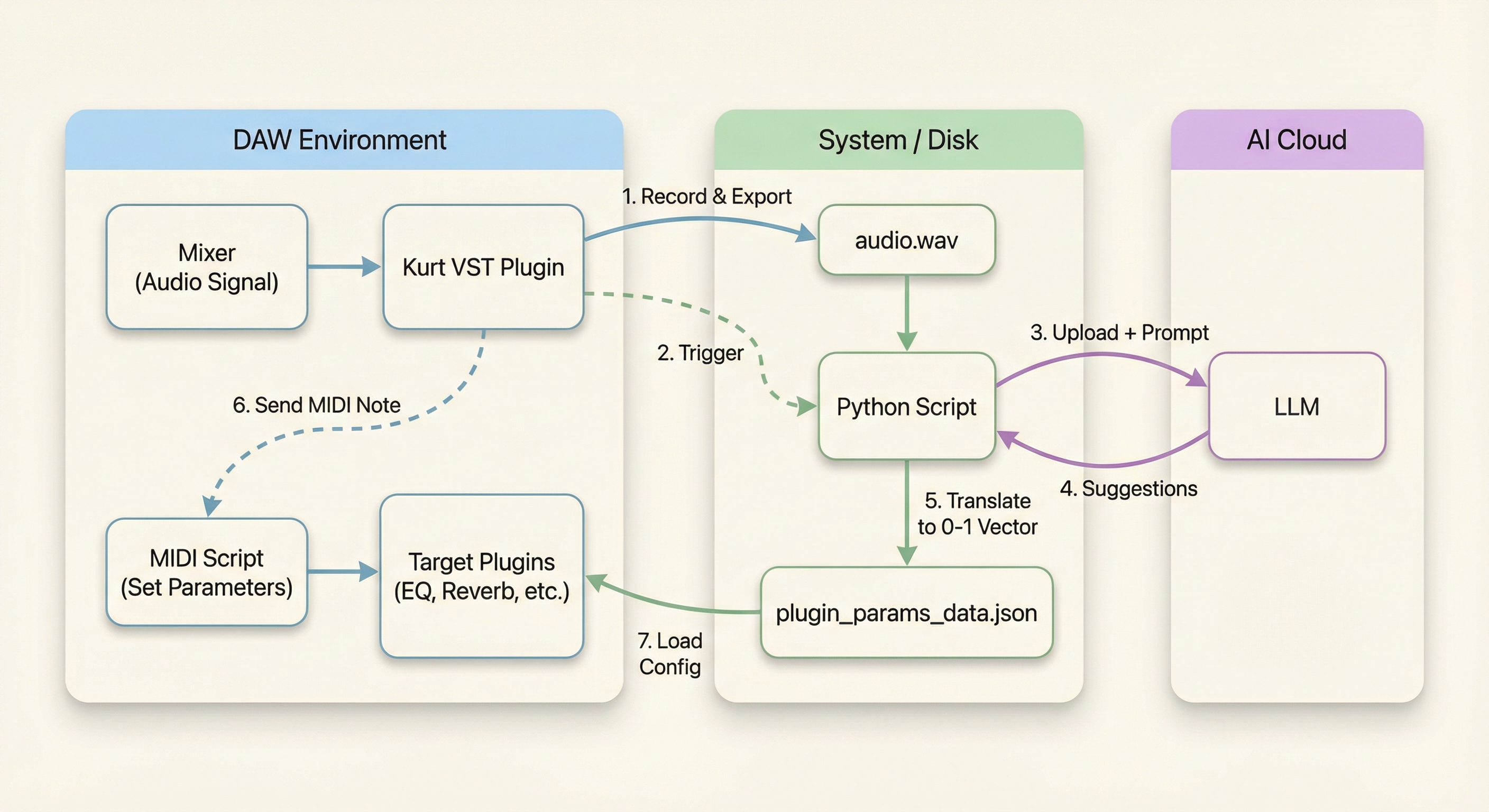
Kurt is a hybrid project that connects a JUCE audio plugin, MIDI scripts, and a Python + (omni) LLM pipeline to suggest mix moves and apply them back to your session. The idea is simple: record a snippet → analyze it with a multimodal LLM → translate suggestions into plugin parameter changes → apply them in DAW.
Once the user hits record, the JUCE plugin records ~10 seconds of audio, exports it to audio.wav, then launches an external analysis executable. Simultaneously it sends a MIDI-signal which scans the current mixer tracks/slots and reads out all plugin parameters providing context needed about instruments, plugins and a rough idea of how the track sounds like, without having to process the audio itself. The analysis executable loads the audio snippet and the MIDI context, then prompts an LLM which understands both audio and text (we used Qwen Omni, see later) to analyze the mix and suggest improvements. The LLM outputs recommendations as JSON, including which plugins to adjust and by how much (“remove lower ends in vocals”), stating loose rationale for each change. These context with the current mixing state is then fed into a reasoning LLM which translates the suggestions into precise values.
Suggested Precise Values →
Processing adjustment for index 21, type 'type', unit 'name', suggested value high_pass
  Band 1 Type: Setting to 'high_pass'
Processing adjustment for index 7, type 'frequency', unit 'hz_target', suggested value 80
  Band 1 Freq: Default 63 Hz. Suggested Target 80 Hz
Processing adjustment for index 14, type 'width', unit 'q_target', suggested value 1.0
  Band 1 Width: Default Q=1.76. Suggested Target Q=1.00
Processing adjustment for index 28, type 'order', unit 'name', suggested value standard
  Band 1 Order: Setting to 'standard'
Processing adjustment for index 2, type 'level', unit 'db_change', suggested value -1.5
  Band 3 Level: Default 0.00 dB. Suggested Change -1.50 dB -> Target -1.50 dB
Processing adjustment for index 9, type 'frequency', unit 'hz_target', suggested value 350
  Band 3 Freq: Default 294 Hz. Suggested Target 350 Hz
Processing adjustment for index 16, type 'width', unit 'q_target', suggested value 1.5
  Band 3 Width: Default Q=1.76. Suggested Target Q=1.50
Processing adjustment for index 23, type 'type', unit 'name', suggested value peaking
  Band 3 Type: Setting to 'peaking'
Processing adjustment for index 30, type 'order', unit 'name', suggested value standard
  Band 3 Order: Setting to 'standard'
Processing adjustment for index 4, type 'level', unit 'db_change', suggested value 1.5
  Band 5 Level: Default 0.00 dB. Suggested Change 1.50 dB -> Target 1.50 dB
Processing adjustment for index 11, type 'frequency', unit 'hz_target', suggested value 3500
  Band 5 Freq: Default 1363 Hz. Suggested Target 3500 Hz
Processing adjustment for index 18, type 'width', unit 'q_target', suggested value 1.2
  Band 5 Width: Default Q=1.76. Suggested Target Q=1.20
Processing adjustment for index 25, type 'type', unit 'name', suggested value peaking
  Band 5 Type: Setting to 'peaking'
Processing adjustment for index 32, type 'order', unit 'name', suggested value standard
  Band 5 Order: Setting to 'standard'
Processing adjustment for index 27, type 'type', unit 'name', suggested value high_shelf
  Band 7 Type: Setting to 'high_shelf'
Processing adjustment for index 6, type 'level', unit 'db_change', suggested value 1.0
  Band 7 Level: Default 0.00 dB. Suggested Change 1.00 dB -> Target 1.00 dB
Processing adjustment for index 13, type 'frequency', unit 'hz_target', suggested value 10000
  Band 7 Freq: Default 6324 Hz. Suggested Target 10000 Hz
Processing adjustment for index 20, type 'width', unit 'q_target', suggested value 1.0
  Band 7 Width: Default Q=1.76. Suggested Target Q=1.00
Processing adjustment for index 34, type 'order', unit 'name', suggested value gentle_4
  Band 7 Order: Setting to 'gentle_4'
Processing adjustment for index 35, type 'main_level', unit 'db_change', suggested value -0.2
  Main Level: Default 0.00 dB. Suggested Change -0.20 dB -> Target -0.20 dB
Finally, these values go through a mapping function to convert them into the 0–1 range which the respective DAW uses internally and written into a new MIDI-Script which gets triggered by the JUCE plugin, when the user clicks “Apply”.
Normalised Output →
{
  "plugin_configs": {
    "Fruity parametric EQ 2_T0_S1": {
      "track": 0,
      "track_name": "Master",
      "slot": 1,
      "params": [0.5416666666666666, 0.5, 0.5, ...]
    },
    "Fruity Reeverb 2_T0_S2": {
      "track": 0,
      "track_name": "Master",
      "slot": 2,
      "params": [0.018785642401878563, 0.16203703703703703, ...]
    },
    "Fruity Limiter_T0_S9": {
      "track": 0,
      "track_name": "Master",
      "slot": 9,
      "params": [0.0, 1.0, 0.93, ...]
    }
  }
}
This is fundamentally different from other AI-mixing tools like iZotope Neutron or LANDR which apply changes directly inside their own plugin interface.
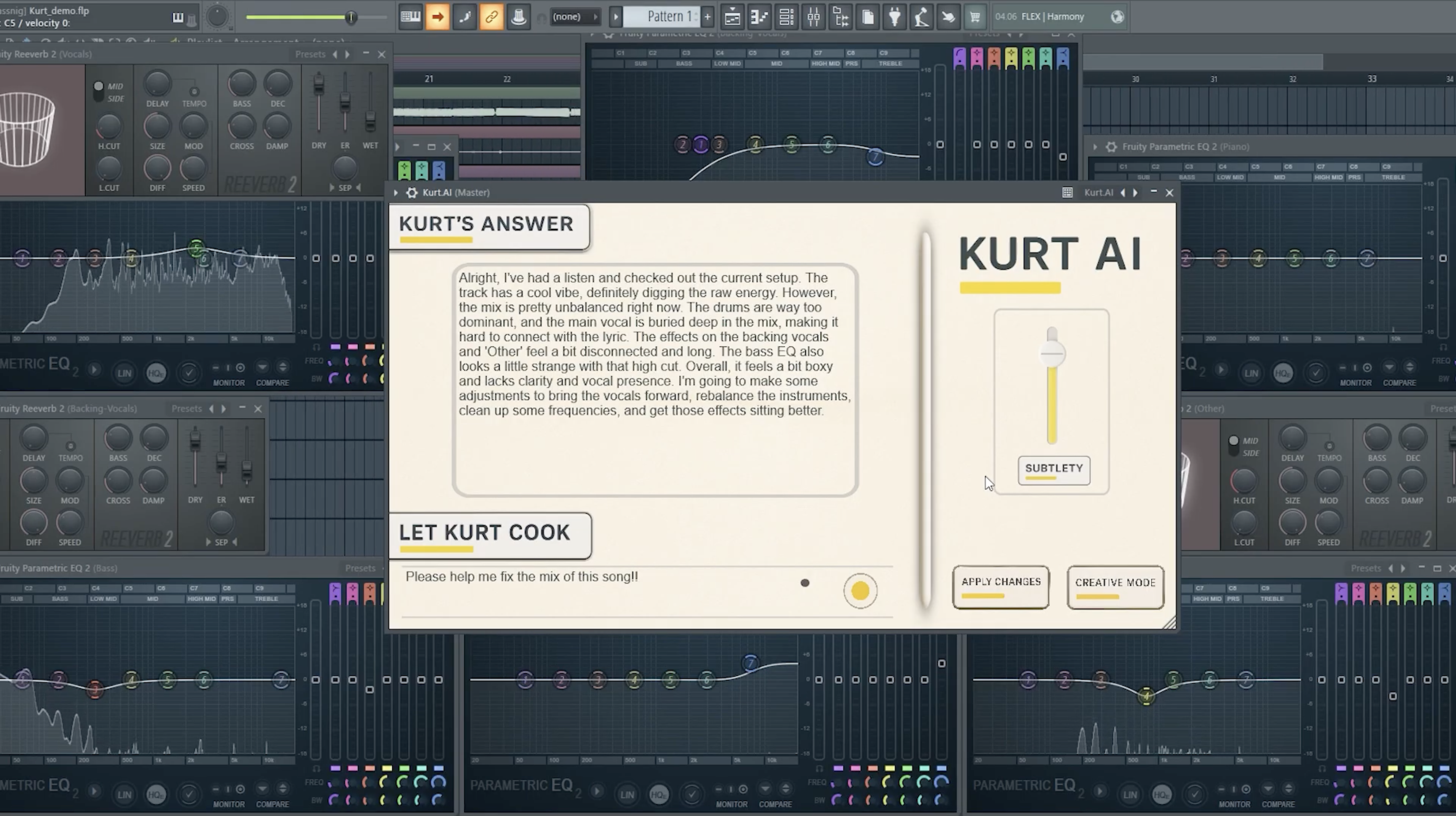
While analysis runs, the UI shows status text and disables the apply button. Once analysis is done, it displays the model summary and enables Apply.
View Kurt UI →

On Audio understanding of LLMs
A key component of Kurt is the use of multimodal LLMs that can understand both audio and text. Current models excel at speech recognition, but music understanding is still in its infancy. Part of the challenge is the high compression and downsampling audio undergoes before being fed into these models, which can strip away important nuances. Since there is no real dataset or evaluation for this task yet, we experimented with several models, including Qwen3-Omni-Instruct, which demonstrated the strongest capabilities in analyzing audio snippets. It also has state-of-the-art performance on RUL MuChoMusic (Weck et al.), which measures music understanding of LLMs. The key thing we found is that the model needs to be provided full context about the mix - what instruments are used, what plugins are on which track, what the settings of each parameter is and how loud each track is. Without that the model struggles to give actionable feedback. We deduce that most of the power of these models still lies in their text understanding capabilities and knowing that how certain instruments and plugins should be set up instead of pure audio understanding.(Edit: Two months after building the first version Kurt, a really cool paper (Zang, Yongyi, et al.) has been released essentially noting the same thing and proposing a new benchmark.)
In order to reach a better understanding of music and mixing, future models will need to be trained on a corpus of high-quality, uncompressed audio data paired with detailed annotations about mixing techniques and outcomes. We are working on a “Mixing LLM” trained on such data to further improve Kurt’s capabilities. We scrape data that includes people discussing mixing techniques, tutorials, and breakdowns of popular songs to create a rich training set. Also people seeking for feedback on their mixes on forums and the answer they get back provide valuable data. This data will be used to fine-tune Qwen Omni 3 to better understand mixing concepts and terminology.
Another use case of Kurt is to synthesize training data. An example is cinematic source separation on which I am writing my thesis right now and hopefully share it soon. By generating synthetic mixes layering vocals, music and sfx with known parameters and outcomes, we can create a controlled dataset to train and evaluate stem-separation models. We let a LLM “direct” a scene by layering tagged vocals, music and sfx and generate cinematic mixed audio along with the isolated stems, which is mixed by Kurt. This is especially useful since high-quality multitrack recordings are hard to come by due to copyright and licensing issues and current cinematic source separation datasets are off from real world scenarios. # add examples later
This type of generation of training data also holds for music. Assuming our Mixing LLM becomes good enough at analyzing mixes and suggesting improvements, we can use the same approach as in cinematic source separation to generate synthetic mixes. On these data we can train and evaluate new separation models and we can synthesize datasets like pre-fx and post-fx stems which are currently not available. Those can be used to train diffusion models that can apply mixing effects in a more controlled manner. Another interesting use case could be the live music generation where a model generates instrument parts in real-time based on a musicians input and the musician can guide the generation by providing feedback on the mix. Google Deepmind proposed something similar with their live music model where a user can toggle the stems of a generated track in real-time.
Introducing Gluten
Sampling is a process done in music-production where short snippets of existing recordings are reused in a new composition. Especially in hip-hop and electronic music, sampling has become an essential technique for creating new sounds. The need in samples can be seen in the rise of sample libraries and marketplaces like Splice and others.
Current diffusion models struggle in producing high-quality, BPM and key aligned, drumless samples that fit the style of the track. We finetuned Stable Audio Open on a large corpus of music loops to create Gluten - an AI model that can generate instrument parts in various styles, BPMs and keys. The model excels in creating hip-hop and electronic music loops that can be directly used in a DAW. Some even starting to publish entire songs made with Gluten.
“Epic Dark Building Synthpad, like a movie”
BPM: 140, Key: , Tempo: Mid
“Gunna Type Beat”
BPM: 150, Key: , Tempo: Fast
The base-version is available on Hugging-Face. Current conditioning is based on audio retrieval from LLM, text prompts, style tags, BPM and key that we get from the DAW and the user. Future work will include audio-injection to further guide the generation process.
AI powered MIDI-Controller
In the process of building Kurt we really had problems to acess DAW parameters programmatically. Each DAW has its own way of exposing plugin parameters to external scripts or plugins, and there is no standardization across different DAWs. To solve this we used MIDI-scripting which is supported by most DAWs. MIDI-scripts allow users to automate tasks and control various aspects of their DAW using MIDI messages. By generating MIDI-scripts based on LLM suggestions, we can apply mix adjustments directly within the DAW without needing deep integration with each specific DAW's API (Shoutout Ableton MCP tho).
This approach is still very limited since MIDI-scripts have limited access to plugin parameters and not all DAWs support them equally well. Which raises the question if traditional DAWs are the right interface for AI-powered music production at all. AI-First DAWs will basically have no constraints on using AI powered tools since they are built around that concept from the ground up. Vector Search on audio, seamless integration of generative models and LLMs and a flexible interface to control AI tools will be essential going forward.We still went with MIDI-scripting since it allows us to reach a broader user base and integrate Kurt into existing workflows - specifically in our own workflows :)
What's Next?
Kurt is still in its early stages, and there are many exciting directions for future development. Don't hesitate to reach out if have inputs!